
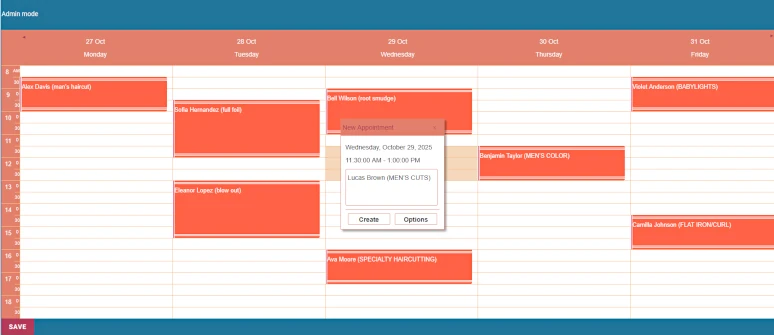
Effortlessly manage and display your schedules on any WordPress page. The MindFusion WordPress Timetable Plugin provides an intuitive and highly customizable solution for any business that runs on a weekly schedule. Whether you're managing a salon, a tutoring center, or a series of events, our plugin makes it easy to keep your clients informed and your business running smoothly.

Display a clear and professional weekly schedule for your practice, allowing patients to easily see doctor availability and booked appointment times.

Organize your class or workshop schedule with color-coded events, making it easy for students to find and register for the right level or topic.

Manage your salon's daily appointments with a clean and stylish timetable, giving clients a clear view of available slots for various services.

Showcase complex event schedules like music festivals or conferences, with multiple performances across different locations and concurrent time slots.
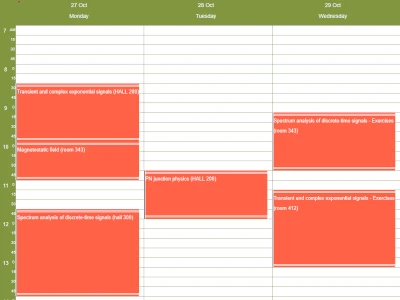
Publish detailed weekly schedules for university classes, exercises, and specific student groups.

Efficiently manage and display the schedule for shared resources, such as lecture halls, meeting rooms, or equipment, including details on usage and users.

Add and configure timetables directly within any page or post using the native WordPress editor.

Show your schedule in a classic vertical layout with days as columns, or a compact horizontal view with days as rows.

Set your schedule's resolution with 15, 30, or 60-minute intervals to perfectly match your business needs.

Manage a single timetable from one central location and effortlessly display it across multiple WordPress pages or posts.

Schedule multiple independent events or appointments within the same time slot and manage concurrent activities, multiple resources, or parallel tracks.

Capture and display comprehensive information for each event or appointment using a customizable details form.

Easily schedule repeating events, appointments or work hours with flexible recurrence patterns.

Choose from 10 professional themes and customize every visual aspect to perfectly match your WordPress site's design and your needs.

Guarantee client privacy by hiding sensitive appointment details from public view, allowing guests to see only available or taken time slots

Download the file mindfusion-timetable.zip from this link. In the dashboard of your WP website navigate to the Plugins menu -> Add Plugin and locate the place where you have downloaded mindfusion-timetable.zip.

Go to the Installed Plugins sub-menu and activate the plugin.
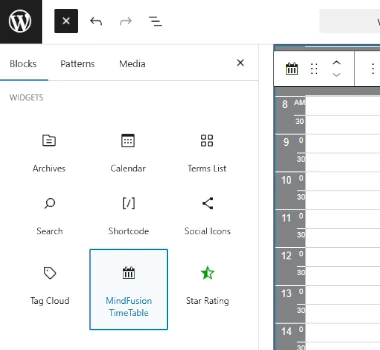
Press the "+" sign at the top left corner of the WordPress dashboard. Navigate to the "Widgets" section, select "MindFusion Timetable" and drop it onto your blog post or page.
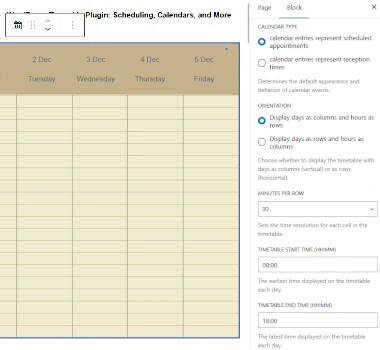
Select the timetable theme, visible days, time intervals, privacy mode, the schedule ID and many other options from the Block properties editor in WordPress.
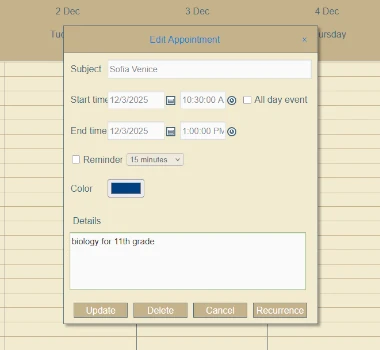
Publish your post/page and open it in the browser while you are logged in WP. Select the timeslot you want for your appointment - the New Appointment dialog appears. You can click Options and further customize your entry. Double click on an Appointment to edit it.

Use the Recurrence dialog that is part of he Appointment Editor to create and customize repeating events - work times, open hours, curriculums etc.
A step-by-step tutorial that shows you how to use the WordPress Timetable plugin to create an eye-catching and responsive class or event schedule in just a few minutes.
A demonstration of the powerful recurring appointments feature, showing you how to set up repeating events in just a few clicks.


For businesses ready to grow, purchasing a Pro license key will:
Get your permanent license for as low as $50 or go for an annual subscription of just $20.
For over two decades, MindFusion has been a leader in creating feature-rich, high-performance software components for developers worldwide. Our expertise spans a wide range of tools, from diagramming and charting to scheduling and reporting. We are committed to providing robust, reliable, and well-documented solutions that empower our users to build exceptional applications. The MindFusion TimeTable plugin for WordPress is our latest step in bringing powerful scheduling tools to an even wider audience.


